
This article discusses interpreting and analyzing radar charts, also known as spider web charts. Examples of interpreting radar charts include employee competency in different positions and customer/product satisfaction. Further details are provided below
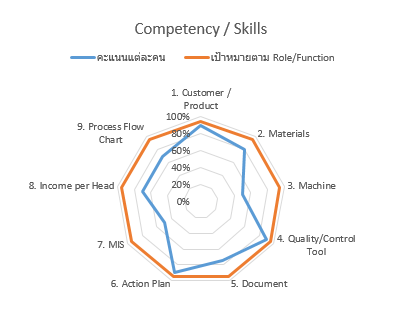
Figure 1, related to HR work, shows the skills and abilities of individuals. The skills shown are related to different job positions and can be compared to the required skills for each position. However, it is not recommended to display the skills of many individuals in different positions, as comparisons are not possible given the unique skills required for each position. When using a spiderweb graph or radar chart, it's best to avoid having too many lines, as this makes analysis difficult.
Analysis of Figure 1 indicates that Mr. A does not yet meet the target for all skills, but he possesses three key skills: Skill 1: A thorough understanding of customers and the products he sells, high-quality work, and proficiency in using tools, enabling him to meet set goals.
Mr. A lacks skills in MIS (Management Information Systems) and needs improvement in his understanding of the tools used in his work.
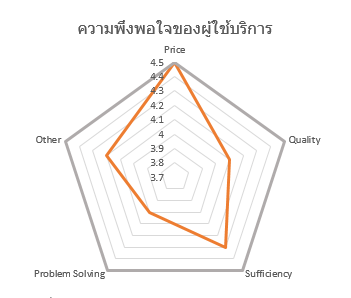
Figure 2 can be applied to various departments, such as customer relations, marketing and sales, and IT support. The graph shows customer satisfaction with products or services. The criteria for measuring satisfaction can be freely changed and added, and it allows you to see which aspects customers rate highly (red lines closer to the corners) and which aspects customers rate less or less (red lines further from the corners)
Read other related articles : Applications of Pareto's Rule or the 80/20 Rule.
Read the full article underthe Business Analytics topic.
For further inquiries, please contact us via our Line Official Account or Facebook Page.

