

What is Microsoft Copilot?
Microsoft Copilot is your AI assistant for work that can help you with tasks like brainstorming, writing articles, coding, and searching. It provides intelligent suggestions and automates repetitive tasks to make your work easier. You can find Copilot chat in the apps you use every day, such as Microsoft 365, Teams, Outlook, and Edge. Copilot helps you connect, create, and work more efficiently
What can a copilot do?
Copilot is an AI system that Microsoft has integrated into several products, including Microsoft 365 (Word, Excel, PowerPoint, Outlook, Teams) and Windows 11 , as well as other platforms. Copilot acts as an "intelligent assistant" that helps users work faster and more efficiently through natural language commands; for example, you can type and communicate with the AI as if you were talking to a person. Examples of what Copilot can do include:
In Microsoft 365:
- Word:
- Automate the writing of articles, reports, or document summaries
- You can request corrections to the language, format, or a summary immediately
- Excel:
- Analyze data, create formulas, and summarize trends from the data in the spreadsheet
- Instruct the system to create a graph or pivot table by typing the commands
- PowerPoint:
- Create a presentation from a Word file or summarize information into slides
- Suggestions for slide design and content
- Outlook:
- Write emails, summarize conversations in old emails, and help organize emails
- Teams:
- Summarize the meeting; retrieve relevant information related to the meeting topic in real-time
- Please follow up on the action items after the meeting
Advantages and disadvantages
Advantages of Microsoft Copilot
- Increase your workflow speed. It helps you write, summarize, and analyze data instantly, saving you more time than doing it yourself.
- Easy to use with typing instructions. You can use plain language to give commands, such as "Summarize this week's meeting" or "Analyze sales for the last 3 months."
- Connect with familiar apps and work seamlessly in Word, Excel, PowerPoint, Outlook, Teams, etc. No need to learn new software.
- Assistance with brainstorming and creative work , such as generating presentation ideas, drafting business emails, writing preliminary articles, etc.
- has a highly secure system , especially within organizations, and guarantees privacy and data storage according to global standards.
- It supports the Thai language well (but is still under development). Although the Thai language support isn't 100% perfect in some contexts, it's still helpful for various tasks.
Limitations of Microsoft Copilot
- There is still a chance of error; mistakes can occur, instructions may be misunderstood, or data may be created that is not 100% accurate. Checking is always necessary.
- There are additional charges
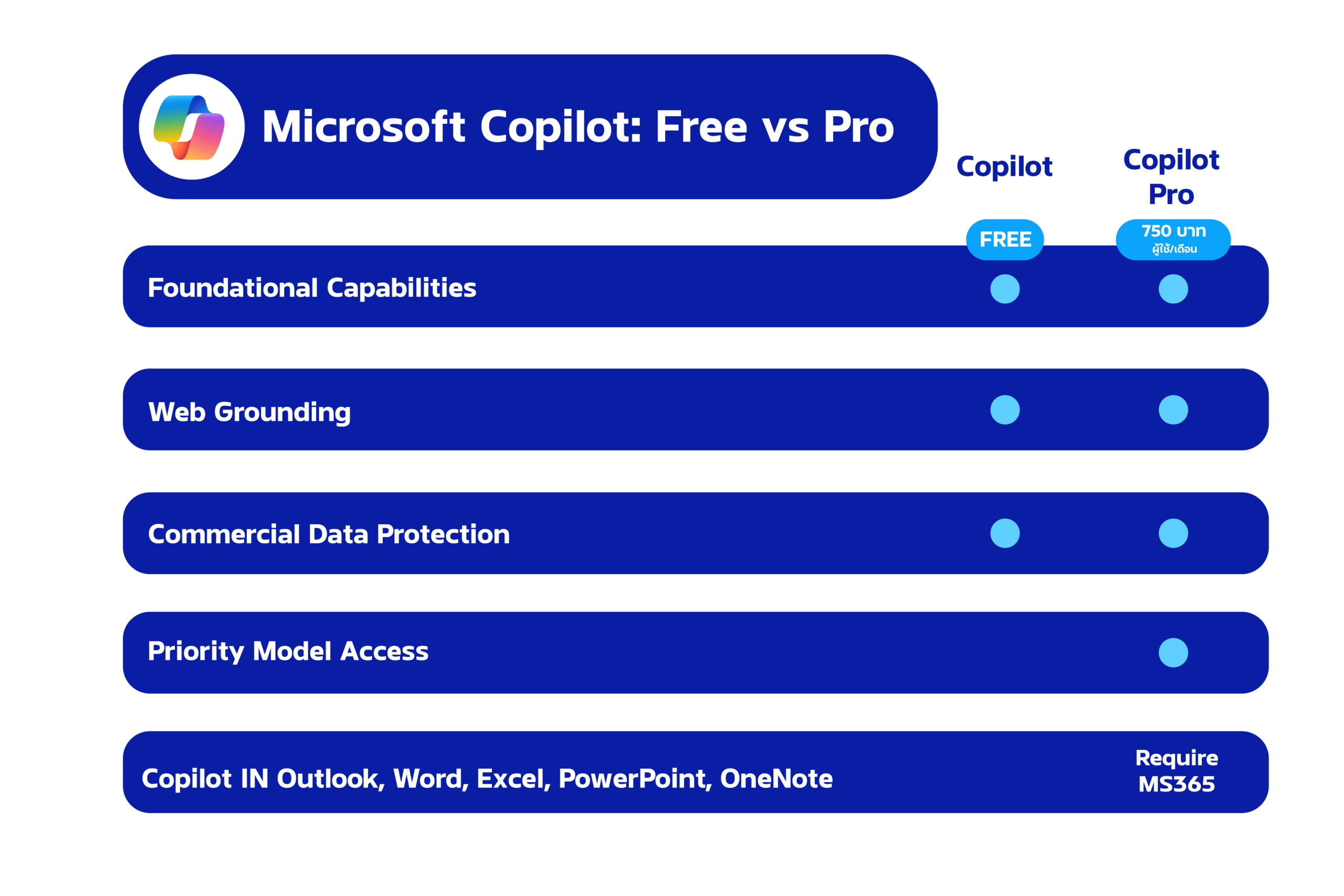
- In most organizations, Copilot must be purchased separately from the regular Microsoft 365 subscription (750 THB/user/month, May 2025)
- I work better in English
- Using English will allow you to understand commands more deeply than using Thai (but Microsoft constantly updates the Thai language version)
- It is necessary to learn how to order it to get the best results
- If the prompt (command) is not written well, the results may not be as expected. More practice in is needed to execute the command
- Some features are still limited
- For example, advanced data analysis functions in Excel may still require some manual intervention and cannot completely replace human tasks
You can find other articles at: https://demo.rdbi.co.th/blog/
For further inquiries or consultations, please contact:
Page: http://bit.ly/rdbipage
Facebook: https://www.facebook.com/RandDBI/
Line OA: @rdbi
Tel: 02-681-9700
Email: sales@rdbi.co.th 🌟