
Why is choosing the right Power Automate license important?
Power Automate is a tool that helps organizations easily automate workflows, reduce repetitive tasks, and increase efficiency. However, choosing the right license will help you use resources efficiently, avoid overspending, and meet your business needs

Factors to consider when choosing a Power Automate license
Before choosing a license, consider the following important factors:
1. The type of workflow to be created
Power Automate has three main types of workflows:
- Cloud Flows – Used for tasks requiring automation in the cloud, such as connecting to Microsoft 365, SharePoint, or other systems.
- Desktop Flows (RPA) – Used for tasks that require bots to perform the work instead of humans, such as filling out data in legacy applications.
- Business Process Flows – Used to define clear, sequential work processes, such as document approval.
2. The size of the team being used
- For single user → Select Per User Plan
- For team use and sharing flow → Select Per Flow Plan.
- There are bots that need to operate without human supervision → Select the Unattended RPA Add-on.
3. Which systems do you need to connect to?
- If you only use Microsoft 365 (Excel, SharePoint, Outlook) → You can use the free license that comes with Microsoft 365 (it's included in the Microsoft 365 package if you purchased Microsoft 365)
- If you need to connect to SQL Server, Dataverse ( add connected enterprise data and enable your copilot to operate with Microsoft Dataverse, the enterprise-level data platform for copilots), external APIs → Premium License is required.
- If you need to use AI or OCR → you must use the AI Builder Add-on.
4. Available budget
Choosing the right license can help reduce costs. For example, if the entire organization needs to use it, a Per Flow Plan instead of purchasing a separate license for each individual.
What are the pricing plans for Power Automate?
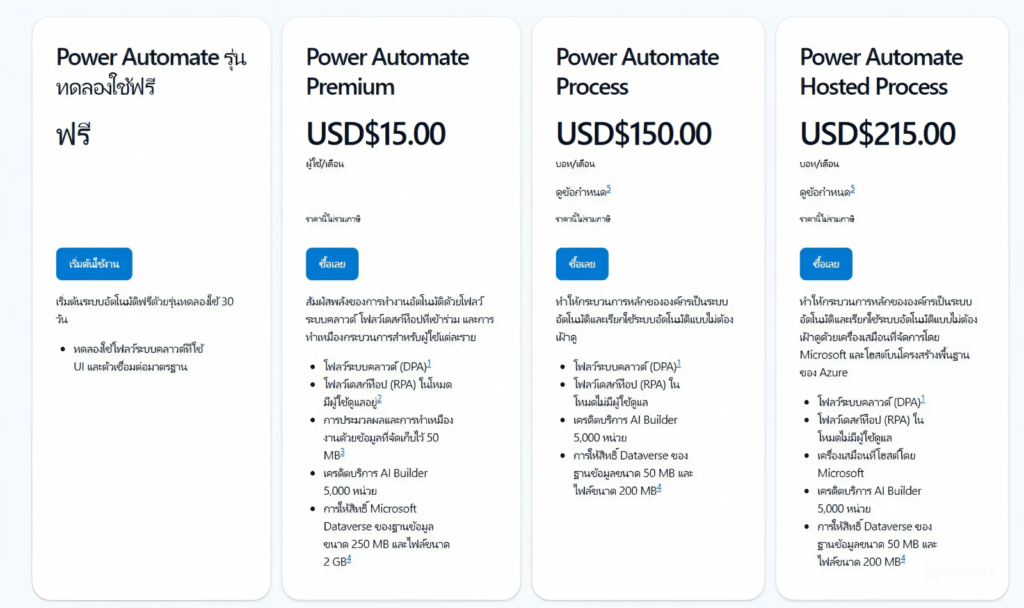
Power Automate Trial Version (Free)
- Try it free for 30 days
- Compatible with UI automation and standard workflows
Power Automate Premium (Price: $15.00 USD/user/month)
Features:
- It can be used for both Digital Process Automation (DPA) and Robotic Process Automation (RPA) with user supervision
- Automate tasks with workflows that support data sizes up to 50 MB
- Received 5,000 AI Builder credits
- You get 250 MB of Microsoft Dataverse space for data and 2 GB for files
Power Automate Process (Price: $150.00 USD/bot/month)
Features received:
- Supports unadministered RPA (Run-as-a-person)
- Can be used at the organizational level
- Received 5,000 AI Builder credits
- You will receive a 50 MB Microsoft Dataverse database for data and a 200 MB file
Power Automate Hosted Process (Price: $215.00 USD/bot/month)
Features received:
- Supports unadministered RPA (Run-as-a-person)
- Working on Microsoft Cloud (Azure)
- Received 5,000 AI Builder credits
- You get 50 MB of Microsoft Dataverse space for data and 200 MB for files
Compare each option
| Plan | price | RPA (Run-as-a-person) | AI Builder | Dataverse area | Hosted on Microsoft Cloud |
|---|---|---|---|---|---|
| Premium | $15/user | ❌ | 5,000 units | 250 MB data, 2 GB attachments | ❌ |
| Process | $150/bot | ❌ | 5,000 units | 50 MB data, 200 MB attachments | ❌ |
| Hosted Process | $215/bot | ✅ | 5,000 units | 50 MB data, 200 MB attachments | ✅ |
Examples of usage options
1. Per User Plan
- Starting price: $15 per user per month.
- Suitable for: Small teams or individual users who want to create workflows for personal tasks.
- Features:
- Create and use an unlimited number of workflows
- Suitable for managing everyday tasks
2. User plan with user-participation RPA (Per User with Attended RPA Plan)
- Starting price: $40 per user per month.
- Suitable for: Businesses requiring an RPA system for desktop-level automation with minimal user intervention.
- Features:
- Everything is included in the individual user plan
- Enhance desktop automation capabilities
3. Workflow Plan (Per Flow Plan)
- Starting price: $100 per workflow per month (minimum 5 workflows)
- Suitable for: Teams that share workflows across departments or organizations.
- Features:
- Grant users unlimited access to specified workflows
- Suitable for enterprise-level automation
The benefits of choosing Power Automate pricing
1. Control costs and expenses
- You can choose a plan that suits your usage and reduce unnecessary expenses
- There is a pay-as-you-go option , allowing you to pay only when you actually use the service.
2. Improve work efficiency
- You can choose the level of features that best suits your organization's needs
- There are Robotic Process Automation (RPA) options that can help reduce repetitive tasks.
3. The size can be adjusted as needed
- If the organization expands, it can upgrade the plan to support more users
- Supports both Cloud Flow and Desktop Flow.
4. Supports connection to a variety of systems
- Higher-end deployment plans often include Premium connectors that can integrate with ERP, CRM, or various databases.
- Supports API connectivity and Microsoft services such as Power BI, Dynamics 365, and SharePoint.
5. There are security and compliance systems in place
- Higher-level plans support Data Loss Prevention (DLP) and access control.
- Supports organizational safety standards such as ISO, HIPAA, GDPR.
6. Supports advanced automation
- Process mining can help analyze work processes to improve efficiency.
- Some plans support AI Builder, which can use AI to analyze data
summarize
Power Automate offers comprehensive solutions for organizations of all sizes, with flexible options and functions tailored to diverse needs. If you're looking for an automated solution, Power Automate is a powerful and worthwhile option
You can find other articles at: https://demo.rdbi.co.th/blog/
For further inquiries or consultations, please contact:
Page: http://bit.ly/rdbipage
Facebook : https://www.facebook.com/RandDBI/
Line OA : @rdbi
Tel : 02-681-9700
Email : sales@rdbi.co.th 🌟