
With various graphs, users can analyze sales trends..
Power BI is a tool that helps business executives easily and comprehensively analyze sales data. By connecting data from various systems such as CRM, ERP, or other databases, users can create reports and dashboards that provide an overview of sales over different time periods, analyze data, and find clear insights
✨Sales graph example
1. Heat Map
- Used for: Displaying data differences using colors; showing sales volume (highest to lowest) by region
- It helps to clearly see regions with varying sales volumes, allowing for the identification of areas needing improvement or further promotional development
2. Waterfall Chart
- Used for: Showing increases and decreases in sales or values at each stage. Useful for understanding how initial values (e.g., net profit) are affected when positive and negative changes occur over a period of time
- It helps to provide an overview of sales increases or decreases at each stage or month, and clearly identifies the factors that influence these changes
3.KPI (Key Performance Indicator)
- Used for: Displaying the progress of work done towards measurable goals
- It helps management and sales teams get an immediate overview of performance and allows them to check whether set targets have been met
4. Scatter Char
- Used for: Displaying the relationship between two variables or two numerical values, such as sales and the number of customers. It helps users clearly see trends and relationships between those variables
- It helps in identifying trends and relationships between variables. Positive or negative correlations can be found
5. Tree Map
- Used for: Displaying data proportionally and distributed in a way that makes it easier to see the differences and relationships between data. It uses area and color to represent the size of data values, displaying data in a hierarchical structure as a series of overlapping rectangles
- It helps to clearly see the sales proportion of each product or customer group, and allows for the identification of the products or customer groups with the highest or lowest sales
Additionally: Each level of the hierarchy is represented by a colored rectangle called a “branch node.” Each branch has a smaller rectangle called a “leaf node.” Power BI uses measure values to determine the size of the rectangles for branches and leaves
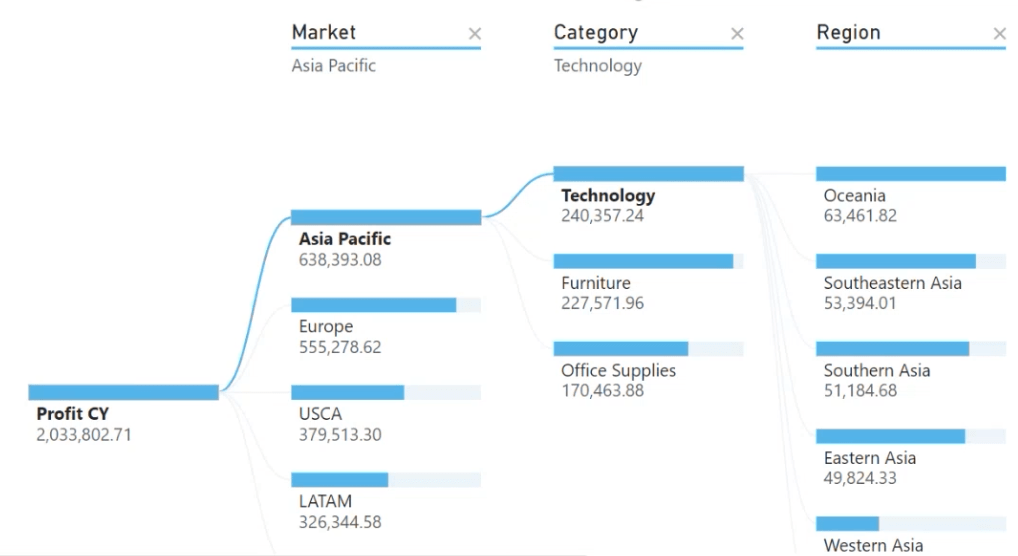
6. Decomposition Tree
- Uses: This tool breaks down data from a main dataset, aiding in in-depth analysis. It allows users to drill down into the data to see which factors impact overall results and understand the reasons for data changes
- It helps to break down data for more detailed information, making the factors affecting sales clearer
7. Smart Narrative
- Used for: Summarizing and presenting information in the form of "automated text" by using AI to analyze data and create in-depth explanations
- This eliminates the need for users to manually analyze and interpret all the data into text; they can simply read the summary automatically generated by the AI
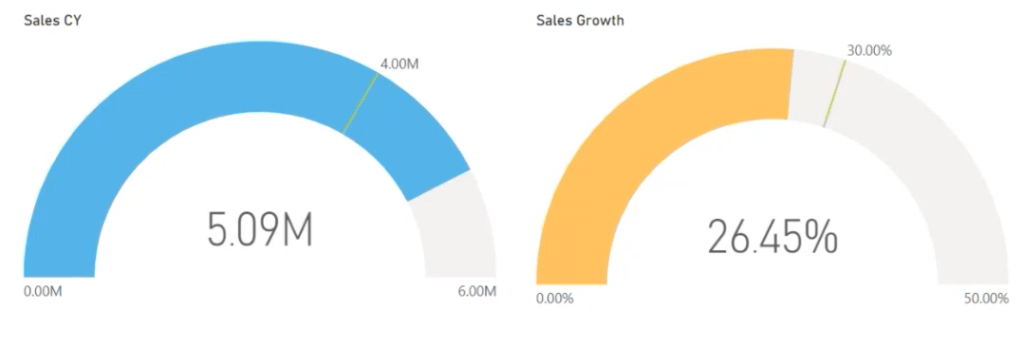
8. Gauge Chart
- Used for: Displaying a comparison between actual sales and targets, showing progress toward achieving company goals, or displaying percentage measurements
- It helps users see a clear current overview of goal achievement and allows them to verify whether actual sales are meeting expectations
Of course, Power BI also offers many other powerful tools to help analyze and visualize sales data. Creating the right dashboards can also help businesses plan and improve their sales processes more effectively!
✨Drive your business forward with data-driven decision-making – Discover the hidden insights within your data.✨
📌For more details on how to purchase a Microsoft Power BI license: https://demo.rdbi.co.th/microsoft-power-bi-buy-license/
😊 If you're unsure how to buy or which type to choose, feel free to contact us. We' happy to give you advice
For more information, please visit the page http://bit.ly/rdbipage
Line OA: @rdbi
Tel: 02-681-9700
Email: sales@rdbi.co.th 🌟
🌟If you are interested in training with us, whether it's Power BI, Tableau, or Business Analytics
Further details can be found at https://demo.rdbi.co.th/services/training-services/