
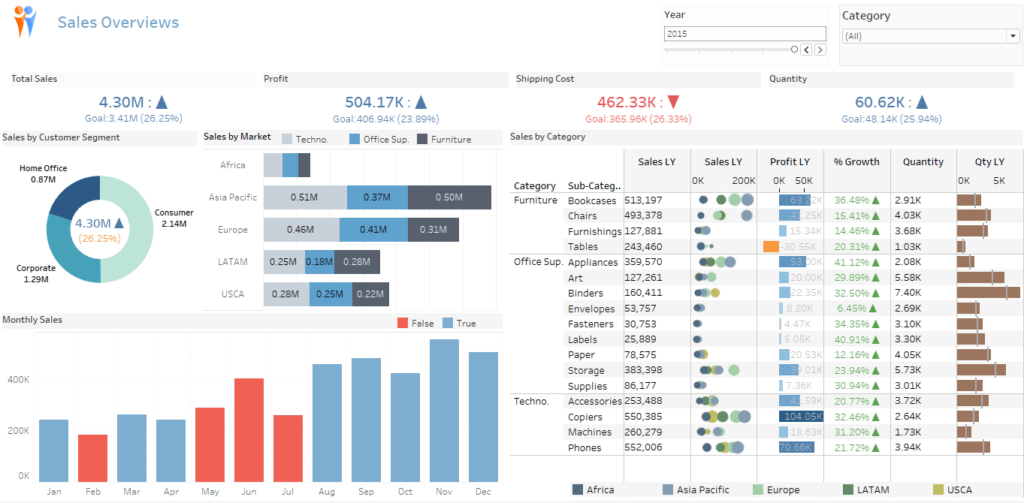
This training course is for those who want to learn how to use Tableau Desktop, from importing data from various sources and data manipulation to creating and defining data models for reporting, and creating Visual Analytics Reports, enabling them to fully utilize the tool for creating data analysis reports for their organization
Training objectives
– Participants will be able to use Tableau Desktop.
– Participants will be able to import data from various data sources.
– Participants will be able to manage data to create data models for practical use.
– Participants will be able to create reports in various formats.
– Participants will be able to customize the report display format for presentation and visual analytics.
– Participants will be able to create custom dashboards and share reports with colleagues.
Suitable for
Individuals, agencies, or organizations that wish to learn how to use tools to create business reports in Visual Analytics format
Training duration
18 hours (3-day course)
Background of the trainees
Have a basic understanding of computer usage and Microsoft Excel
Further details
Participants are required to bring their own notebooks with Tableau Desktop and Tableau Prep Builder installed (trial versions can be downloaded from tableau.com), or they may use Tableau Desktop Public Edition instead
*If you install a trial version of Tableau Desktop or Tableau Prep, you will only be able to use it for 14 days. Please allow sufficient time to bring your computer to the training session.*
Training topics
Day 1
Introduction to Tableau Desktop
- Understand the overview of the Tableau Desktop program
- Downloading and installing the program
- Introducing the program components
- Please provide sample information to be used in the training
Connect to Data Source
- Connect Data Source
- Connect to File & other
- Excel, CSV, Text, PDF
- File on Google Drive
- File on OneDrive
- Connect to SQL Server & SSAS
- Adding another data source
- Live & Extract connection
- Edit data connection
- Connect to File & other
- Data Extracts
- Create Extracts
- Using Extracts
- Refreshing Extracts
- Changing data source
- Data Source Filter
- Save Workbook & Workbook Type
Manage Data Model
- Relationship
- Join Type, Union
- Join Type
- Create Join & Union
- Data Blending
- What is Data Blending
- Blend relationship
- Create Data Blending
- Swapping Primary & Secondary data sources
- Managing Metadata
- Dimension and Measure
- Change Data Type
- Manage Field
- Create Set & Grouping
- Create Folder & Hierarchy
- Set & Grouping
Tableau Report & Dashboard
- The basics of creating Tableau visuals
- Creating visuals with Show Me
- Organizing and displaying data on a visual platform
- Managing Worksheets
- Creating Common Visual
- Table & Highlight Table Chart
- Column & Bar Chart
- Side by Side Column & Bar
- Stacked Column & Bar
- Line & Area Chart
- Pie Chart
- Scatter Plot
- Score Card
- Creating a Dual Axis Visual
- Donut Chart
- Combination Chart
- Bar in Bar Chart
- Visual Option
- Chart Label
- Chart tooltip
- Tableau Filter
- Create Filter
- Interactive Filter
- Context Filter
- Tableau Dashboard
- Creating a Dashboard on Tableau Desktop
- Device Layout Dashboard
- Configuring interactive features for reports on the dashboard
- Sharing Tableau Desktop reports
Day 2
Power Up Your Report
- Creating a Custom KPI card
- Creating a Custom Label
- Creating a Custom Tooltip
- Basic Color Conditional
- Using Mark card Color
- Creating Dynamic Colors for Bar & Column Charts
- Creating a Dynamic Color Score Card KPI
- Introduction to the Analytics Pane
- Trend line
- Reference line
- Forecasting Data
- Creating a Custom Visual
- Bullet Chart
- Custom chart by Dual Axis
- Line chart with markers
- Lollipop Chart
- Multi-Chart by Dual Axis
- Population Pyramid Chart
- Toggle Chart
- Drill Through Report
- Creating a Visual Map
- Symbol Map Chart
- Map Chart
- Edit Map Location
- Edit Map Style
Tableau Calculations
- Basic Calculation
- Row level calculation
- Aggregate Calculation
- Table Calculation
- Basic LOD Calculation
- Tableau Parameter
Day 3
Transform Data by Tableau Desktop & Tableau Prep
- Prepare Data by Tableau Desktop Introducing basic data management with Tableau Desktop
- Data Interpreter
- Pivot
- Metadata Grid
- Split & Custom Split
- Rename Field
- Aliases Field
- Create Group
- Create Calculated Field
- Basic Tableau Prep Introducing the basics of using Tableau Prep
- Input Step
- Cleaning Step
- Group & Replace
- Profile Pane
- Pivot Step
- Aggregate Step
- Join & Union Step
Tableau Cloud
*This can also be adapted for use with Tableau Server
- Introducing Tableau Cloud
- Sign up for a trial (for those who don't have one yet)
- Publishing a report to Tableau Cloud
- Editing reports on Tableau Cloud
- Configuring report refresh notifications on Tableau Cloud
- Using Tableau Bridge
- Sharing reports from Tableau Cloud
Tableau Public
- Introducing Tableau Public
- Registration (for those who don't already have one)
- Publishing a report to Tableau Public using Tableau Desktop
- Editing reports on Tableau Public
- Public server settings to configure data display
- Sharing reports from Tableau Public
Instructor
Kiattipong Daikarn (Profile)
Senior BI Developer
Training format
note
The schedule may be subject to change.
Every step of the practical training will include examples, and instructors will provide guidance throughout the workshop.
For more information, please contact us at https://demo.rdbi.co.th/contact/,
via our
Line official account: @rdbi,
or by email at sales@rdbi.co.th.